Can Claude Apply to Jobs for You? Claude in Chrome and Cowork (2026)
Claude can now click, type and fill out forms in Chrome. Can it apply to jobs for you? Here's what Claude in Chrome and Claude Cowork can do for a job search, what Anthropic says they won't do, and when a dedicated job search agent fits better.
SIMPLEAPPLY · AI JOB SEARCH
Updated October 2026
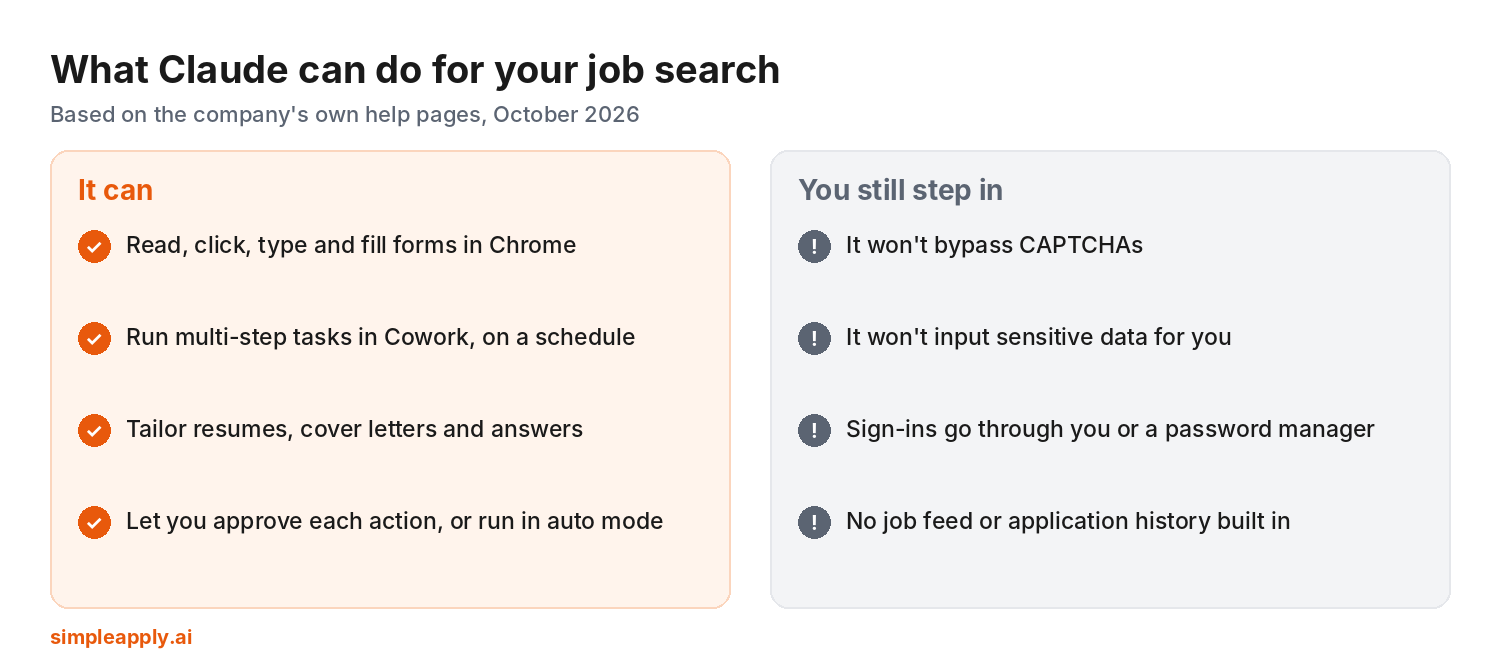
Short answer: partly. Claude in Chrome can read job pages, click, type and fill out application forms, and Claude Cowork can run multi-step tasks on a schedule. But Anthropic says Claude won't bypass CAPTCHAs or input sensitive data, sign-ins go through you, and there's no built-in job feed or application history. It's a capable helper for one application at a time, not a full job search on autopilot.
Videos like "I let Claude apply for jobs while I slept" are all over YouTube and LinkedIn right now. Here's what's actually possible, based on Anthropic's own help pages.
The Claude tools that matter for a job search
- Claude in Chrome is a browser extension that lets Claude "read, click, and navigate websites alongside you," including filling out forms. It's on paid Claude plans and works in Google Chrome only (Claude help).
- Claude Cowork lets you describe an outcome and Claude works through the steps, with files on your computer, a browser, and scheduled tasks that run in the cloud. You choose whether Claude asks before each action, checks actions automatically, or doesn't check (Claude help).
- Claude Code is a coding tool. Developers have used it to build their own job application scripts, which you'll see on Reddit and GitHub.
What Claude can and can't do for job applications
| Job search task | Can Claude do it? | What Anthropic says |
|---|---|---|
| Fill out an application form | Yes, in Chrome | Claude can click, type and fill out forms on sites you're viewing |
| Get past a CAPTCHA | No | Bypassing CAPTCHAs is on Anthropic's prohibited list |
| Enter sensitive data (like an SSN) | No | Inputting sensitive data is prohibited |
| Sign in to career sites | Only with you | Through you or a password manager like 1Password, so Claude never sees the password |
| Run tasks on a schedule | Yes | Cowork and Claude in Chrome support scheduled tasks |
| Find new matching jobs every day | Partly | No built-in job database. You point it at searches |
| Track every application and reply | No | Nothing built in. You keep your own log |
Sources: Use Claude in Chrome safely · Get started with Claude in Chrome · Get started with Claude Cowork.
Where Claude runs into trouble on job applications
1. CAPTCHAs and bot checks
Many job boards and some application systems use CAPTCHAs. Anthropic lists bypassing them as something Claude won't do, so you'll be pulled back in.
2. Sensitive fields
Some applications ask for things like a Social Security number, date of birth or demographic details. Anthropic lists inputting sensitive data as prohibited and says you remain responsible for every action in the browser.
3. Accounts on every employer's site
Workday asks for a new account at each company. Claude can work with a password manager for sign-ins, but somebody still has to create and verify those accounts.
4. Finding jobs and keeping score
Claude doesn't come with a feed of new openings or a record of where you applied, what you answered and who replied. Jobright makes the same point in its own Cowork guide.
The bottom line
Claude is a strong partner for tailoring, writing and filling in individual applications, especially in Chrome. If you want matching applications going out every day and every reply in one place, you need an agent built for job applications. Here's how a personal job search agent works.
How to use Claude for your job search
- Give it a profile doc with your standard answers so every application is consistent.
- Start in "ask before acting" mode and review what it enters on each form.
- Use it for tailoring: resume bullets, cover letters and short answers. Check what recruiters look for first.
- Handle CAPTCHAs, sign-ins and sensitive fields yourself.
- Keep a log of every job, date and answer.
Claude vs a dedicated job search agent
| Task | Claude | Job search agent (SimpleApply) |
|---|---|---|
| Tailor resume and write cover letters | Great fit | Personalized cover letter per application |
| Find new matching jobs every day | You point it at searches | Built in, multiple times a day |
| Apply on Workday, Greenhouse, Lever, iCIMS | One form at a time, with you for CAPTCHAs and sign-ins | Applies directly on 20+ systems |
| Track applications and replies | Manual | Built in |
SimpleApply finds matching roles, applies on the employer's own application system, emails you each time it applies and collects replies in one inbox. You set titles, keywords, excluded companies and how closely a job has to match. More on the features page.
Frequently asked questions
Can Claude apply to jobs for me?
Partly. Claude in Chrome can fill out application forms, but it won't bypass CAPTCHAs or input sensitive data, and you handle sign-ins. It doesn't find jobs daily or track your applications on its own.
How do I use Claude to apply for jobs automatically?
You can set up scheduled tasks in Claude Cowork or Claude in Chrome, but you'll still step in for CAPTCHAs, sign-ins and sensitive fields. For fully automatic applying, use a job search agent built for it.
Can I connect Claude to LinkedIn to apply for jobs?
Claude in Chrome can work on sites you're signed in to in Chrome. Check each site's terms on automated activity, and expect bot checks on job boards.
Is Claude better than ChatGPT for job applications?
Both can fill forms in a browser with you approving key steps, and both are strongest at writing. See can ChatGPT apply to jobs for you? for the side-by-side.
Published by Joe Perrotta, Founder of SimpleApply, October 2026. Product details are based on Anthropic's public help pages as of October 2026 and may change. Related reading: Can Perplexity Computer apply to jobs? · Best AI agents to apply for jobs in 2026